0x00 前言在本文中,我们将使用不同的Nmap Ping扫描来扫描发现目标主机。 一个系统管理员可能只会使用Ping来检测某个主机是否存活,但一个安全人员可能会使用各种方法绕过防火墙进行检测。 在Namp中使用Ping扫描来检测主机是否存活。我们知道在默认情况下,Ping发送ICMP回应请求,并在系统处于活动状态时获取ICMP响应回复。默认情况下,Ping扫描发送一个ARP数据包来获取主机是否存活。 Nmap会根据它扫描的网络来改变它的扫描方式。
1.如果扫描的时本地网络,Nmap在每次扫描时发送ARP数据包
2.如果是扫描外网就发送以下请求数据包:
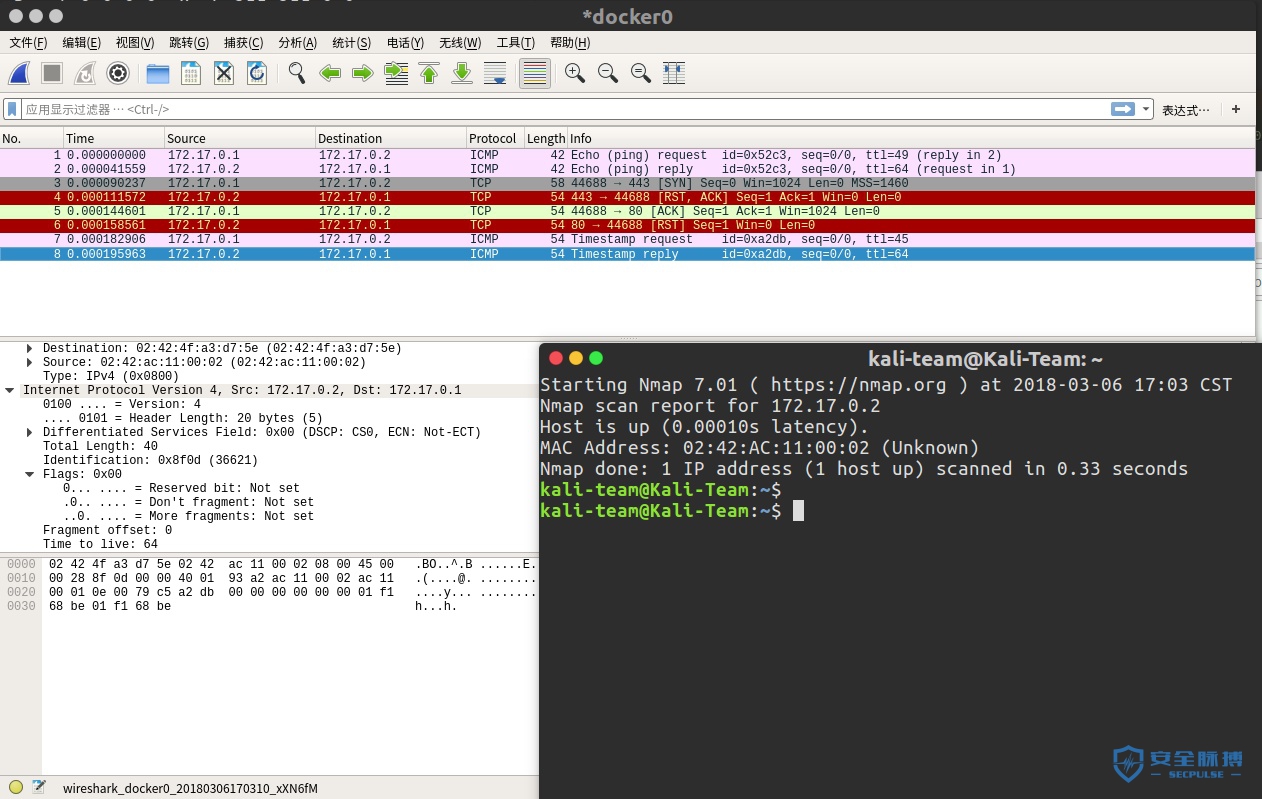
ICMP回应请求 ICMP时间戳请求 TCP SYN到端口443 TCP ACK到端口80
0x01 开始Starting Nmap 7.01 ( https://nmap.org ) at 2018-03-06 16:58 CST
Nmap scan report for 172.17.0.2
Host is up (0.00013s latency).
MAC Address: 02:42:AC:11:00:02 (Unknown)
Nmap done: 1 IP address (1 host up) scanned in 0.31 seconds
或者 sudo nmap -sn 172.17.0.2 -disable-arp-ping
Starting Nmap 7.01 ( https://nmap.org ) at 2018-03-06 16:59 CST
Nmap scan report for 172.17.0.2
Host is up (0.000096s latency).
MAC Address: 02:42:AC:11:00:02 (Unknown)
Nmap done: 1 IP address (1 host up) scanned in 0.29 seconds

防Ping扫描 出了点状况 docker的iptables出了问题
- 现在我的IP改为:192.168.43.236
- 目标IP改为:192.168.43.132 (虚拟机)
sudo iptables -I INPUT -p ICMP -j DROP
sudo iptables -I INPUT -p tcp --tcp-flags ALL ACK --dport 80 -j DROP
sudo iptables -I INPUT -p tcp --tcp-flags ALL SYN --dport 443 -j DROP
sudo nmap -sn 192.168.43.132 -disable-arp-ping
Starting Nmap 7.01 ( https://nmap.org ) at 2018-03-06 23:46 CST
Note: Host seems down. If it is really up, but blocking our ping probes, try -Pn
Nmap done: 1 IP address (0 hosts up) scanned in 3.08 seconds
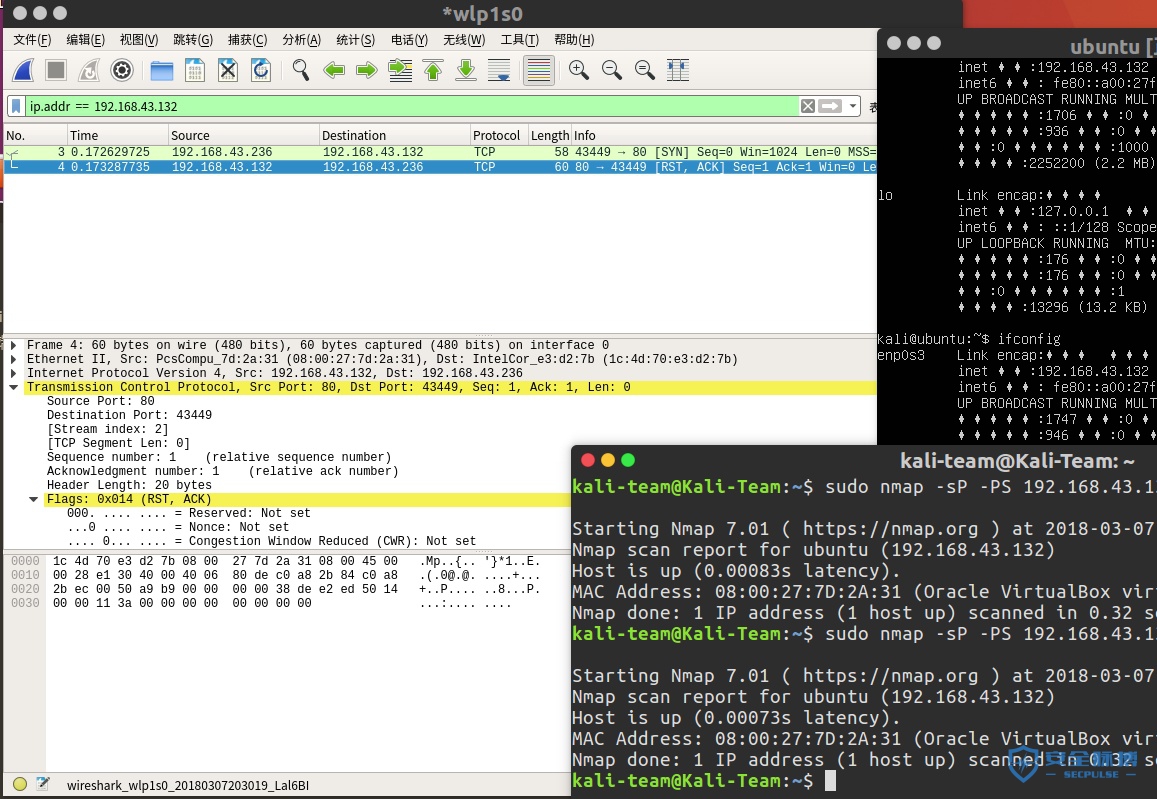
使用TCP SYN Ping绕过防火墙sudo nmap -sP -PS 192.168.43.132 -disable-arp-ping
Starting Nmap 7.01 ( https://nmap.org ) at 2018-03-07 20:11 CST
Nmap scan report for ubuntu (192.168.43.132)
Host is up (0.00062s latency).
MAC Address: 08:00:27:7D:2A:31 (Oracle VirtualBox virtual NIC)
Nmap done: 1 IP address (1 host up) scanned in 0.31 seconds
kali-team@Kali-Team:~$

过滤TCP SYN Ping扫描 sudo iptables -I INPUT -p tcp --tcp-flags ALL SYN -j DROP
sudo nmap -sP -PS 192.168.43.132 -disable-arp-ping
Starting Nmap 7.01 ( https://nmap.org ) at 2018-03-07 21:01 CST
Note: Host seems down. If it is really up, but blocking our ping probes, try -Pn
Nmap done: 1 IP address (0 hosts up) scanned in 2.09 seconds
kali-team@Kali-Team:~$
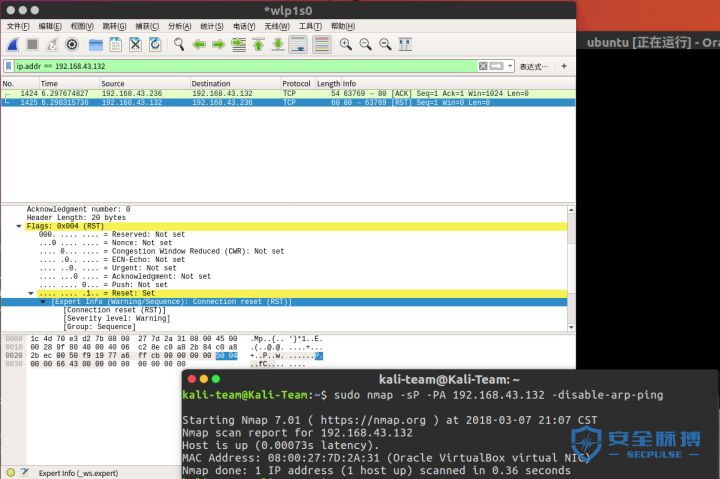
使用TCP ACK Ping绕过TCP SYN Pingsudo nmap -sP -PA 192.168.43.132 -disable-arp-ping
Starting Nmap 7.01 ( https://nmap.org ) at 2018-03-07 21:06 CST
Nmap scan report for 192.168.43.132
Host is up (0.00082s latency).
MAC Address: 08:00:27:7D:2A:31 (Oracle VirtualBox virtual NIC)
Nmap done: 1 IP address (1 host up) scanned in 0.36 seconds
kali-team@Kali-Team:~$

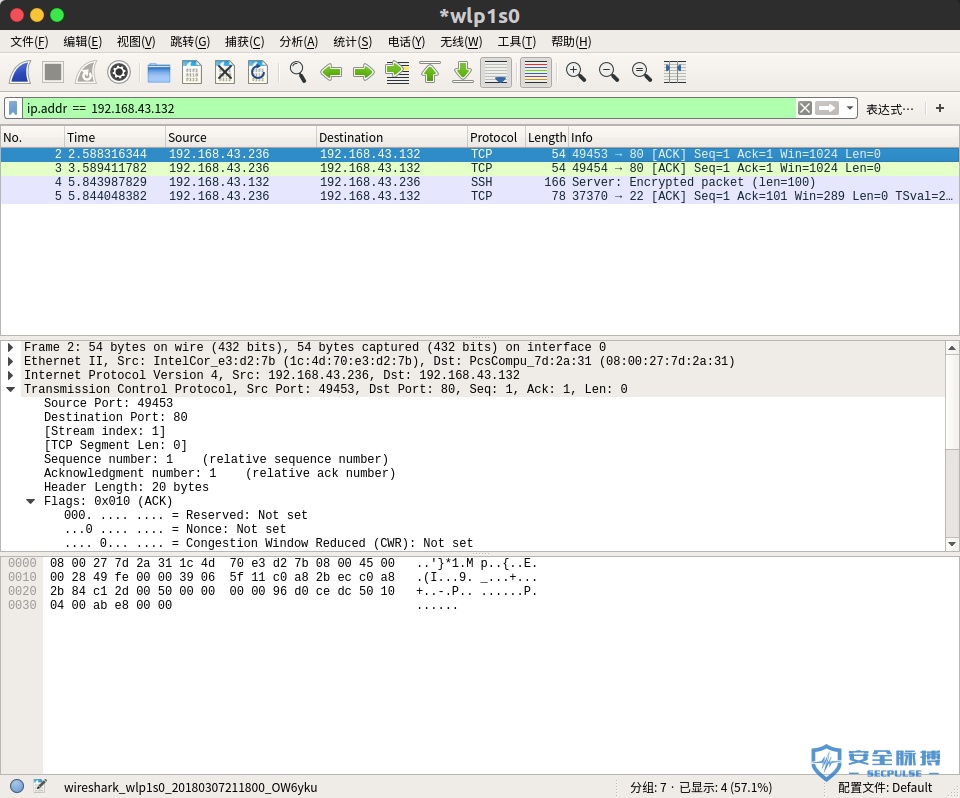
- 现在有发现可以检测到主机在线了。在上面的图片中你可以看到ACK数据包发送到80端口。目标以RST数据包回复。 再拦截上面的TCP ACK Ping扫描sudo iptables -I INPUT -p tcp --tcp-flags ALL ACK -j DROP
sudo nmap -sP -PA 192.168.43.132 -disable-arp-ping
Starting Nmap 7.01 ( https://nmap.org ) at 2018-03-07 21:18 CST
Note: Host seems down. If it is really up, but blocking our ping probes, try -Pn
Nmap done: 1 IP address (0 hosts up) scanned in 2.10 seconds
kali-team@Kali-Team:~$

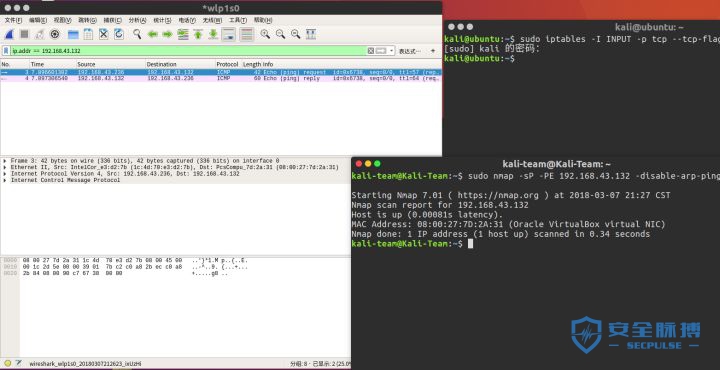
- 然后上次的方法又不行了是吧,然而目标主机并不鸟我,请忽视第三个ssh协议的,那是我ssh登录上执行命令的。 使用ICMP回环绕过TCP ACK Pingsudo nmap -sP -PE 192.168.43.132 -disable-arp-ping
Starting Nmap 7.01 ( https://nmap.org ) at 2018-03-07 21:25 CST
Nmap scan report for 192.168.43.132
Host is up (0.00081s latency).
MAC Address: 08:00:27:7D:2A:31 (Oracle VirtualBox virtual NIC)
Nmap done: 1 IP address (1 host up) scanned in 0.49 seconds
kali-team@Kali-Team:~$

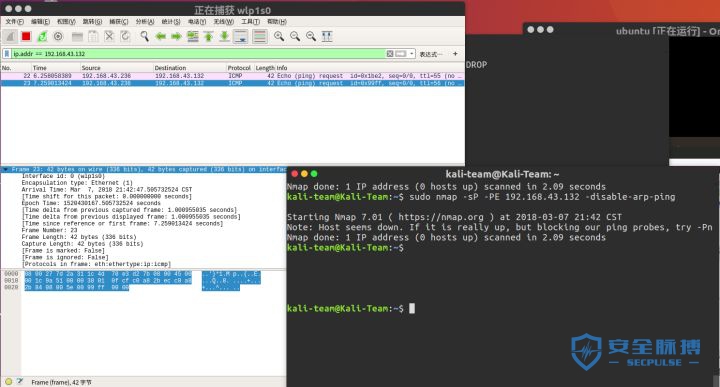
- 我们要用Ping扫描ICMP数据包来绕过刚刚的规则,所以我们要使用-PE参数发送ICMP回环数据包。 再拦截上面的ICMP回环sudo iptables -A INPUT -p icmp -m icmp --icmp-type echo-request -j DROP
sudo nmap -sP -PE 192.168.43.132 -disable-arp-ping
Starting Nmap 7.01 ( https://nmap.org ) at 2018-03-07 21:42 CST
Note: Host seems down. If it is really up, but blocking our ping probes, try -Pn
Nmap done: 1 IP address (0 hosts up) scanned in 2.09 seconds
kali-team@Kali-Team:~$

- 目标也没有回应,拦截成功。 使用ICMP时间戳Ping绕过ICMP回环sudo nmap -sP -PP 192.168.43.132 -disable-arp-ping
Starting Nmap 7.01 ( https://nmap.org ) at 2018-03-07 21:46 CST
Nmap scan report for 192.168.43.132
Host is up (0.00087s latency).
MAC Address: 08:00:27:7D:2A:31 (Oracle VirtualBox virtual NIC)
Nmap done: 1 IP address (1 host up) scanned in 0.35 seconds
kali-team@Kali-Team:~$
我再拦截所有ICMP扫描 sudo iptables -I INPUT -p ICMP -j DROP
sudo nmap -sP -PP 192.168.43.132 -disable-arp-ping
Starting Nmap 7.01 ( https://nmap.org ) at 2018-03-07 21:59 CST
Note: Host seems down. If it is really up, but blocking our ping probes, try -Pn
Nmap done: 1 IP address (0 hosts up) scanned in 2.10 seconds
kali-team@Kali-Team:~$
sudo iptables -F
使用UDP绕ICMP扫描sudo nmap -sP -PU 192.168.43.132 -disable-arp-ping
Starting Nmap 7.01 ( https://nmap.org ) at 2018-03-07 22:11 CST
Nmap scan report for 192.168.43.132
Host is up (0.00086s latency).
MAC Address: 08:00:27:7D:2A:31 (Oracle VirtualBox virtual NIC)
Nmap done: 1 IP address (1 host up) scanned in 0.35 seconds
kali-team@Kali-Team:~$

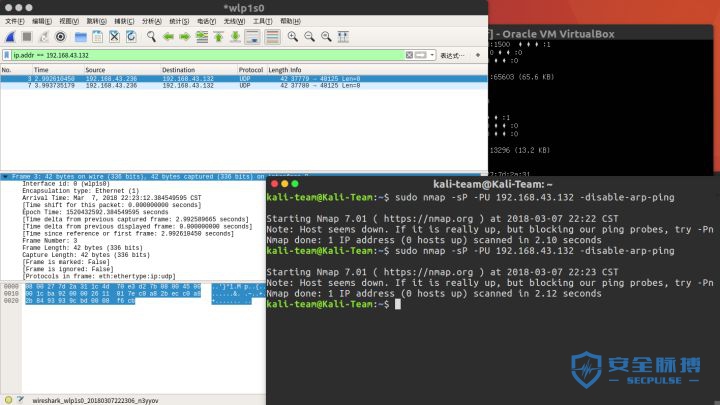
- 看到目标回复Destination unreachable (Port unreachable)没,这就表示主机还活着。 再再把UDP拦截了sudo iptables -I INPUT -p ICMP -j DROP
sudo iptables -I INPUT -p tcp --tcp-flags ALL ACK --dport 80 -j DROP
sudo iptables -I INPUT -p tcp --tcp-flags ALL SYN --dport 443 -j DROP
sudo iptables -I INPUT -p udp -j DROP
sudo nmap -sP -PU 192.168.43.132 -disable-arp-ping
Starting Nmap 7.01 ( https://nmap.org ) at 2018-03-07 22:22 CST
Note: Host seems down. If it is really up, but blocking our ping probes, try -Pn
Nmap done: 1 IP address (0 hosts up) scanned in 2.10 seconds
kali-team@Kali-Team:~$

利用协议绕过UDP和Pingsudo nmap -sP -PO 192.168.43.132 -disable-arp-ping
Starting Nmap 7.01 ( https://nmap.org ) at 2018-03-07 22:25 CST
Nmap scan report for 192.168.43.132
Host is up (0.00078s latency).
MAC Address: 08:00:27:7D:2A:31 (Oracle VirtualBox virtual NIC)
Nmap done: 1 IP address (1 host up) scanned in 0.35 seconds
kali-team@Kali-Team:~$

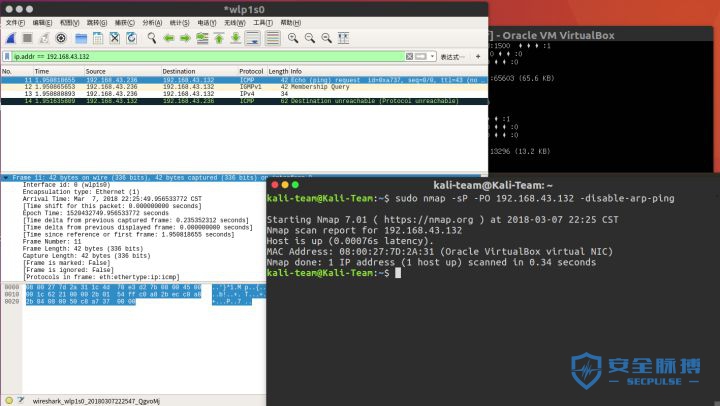
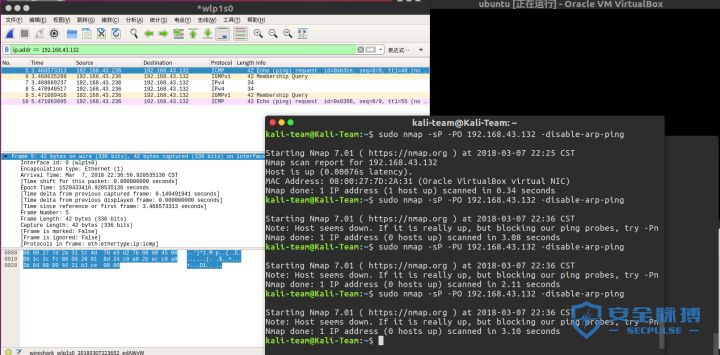
- 在ICMP TCP和UDP都被拦截时,我们可以用-PO参数发送有IP头中特定协议号的IP数据包,如果没有指定协议,则发送多个用于ICMP,IGMP和IP-in-IP协议。
- 在上面抓包可以看出来: 1.发送ICMP Echo到目标主机
2.向目标发送IGMP查询
3.发送IPv4到目标主机
4.收到ICMP Destination unreachable (Port unreachable) 最后一个禁止IP协议扫描
sudo iptables -I INPUT -p ICMP -j DROP
sudo iptables -I INPUT -p tcp --tcp-flags ALL ACK --dport 80 -j DROP
sudo iptables -I INPUT -p tcp --tcp-flags ALL SYN --dport 443 -j DROP
sudo iptables -I INPUT -p udp -j DROP
sudo iptables -I INPUT -p IP -j DROP

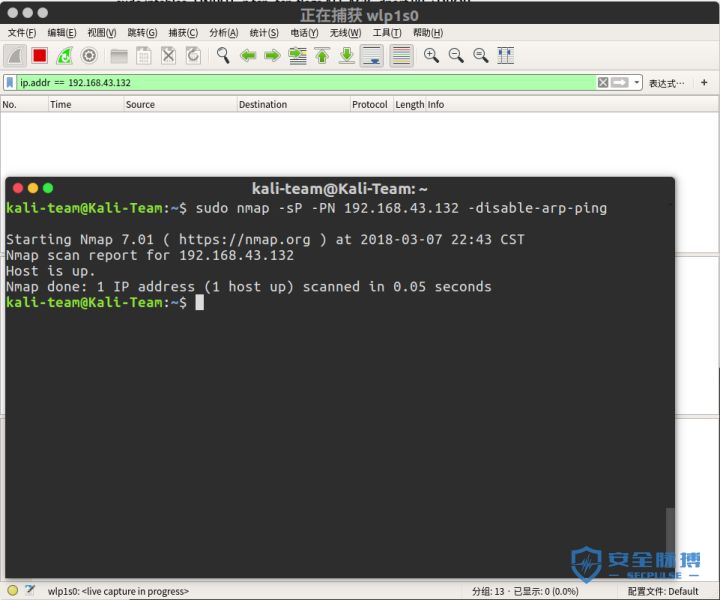
使用NO Ping绕过IP协议 sudo nmap -sP -PN 192.168.43.132 -disable-arp-ping
Starting Nmap 7.01 ( https://nmap.org ) at 2018-03-07 22:41 CST
Nmap scan report for 192.168.43.132
Host is up.
Nmap done: 1 IP address (1 host up) scanned in 0.04 seconds
kali-team@Kali-Team:~$

- 发现啥都没有,但是可以看到主机的状态时up的,完了!!!
0x03 后续 | 


 注册
注册 登录
登录